The gift of the grant and its many challenges
Did you know Google offers nonprofit summer camps up to $10,000 a month in free advertising? Eligible 501(c)(3) camps can use the Google Ad Grant to drive camper enrollment without spending a single dime on ad placements.
But what makes a camp eligible?
How do you apply?
How do you set up the account and get started?
Once approved, how do you get the notoriously elusive performance you want out of your Ad Grant account?
What are the traps and challenges?
How do you stay compliant?
Well, we intend to answer those very questions here. But first of all…
Who is CampAds?
CampAds is a small, independent team of Google Ads experts, based in Michigan. We help nonprofit summer camps utilize the Google Ad Grant. We also help for-profit camps drive more qualified leads with their paid ads.
You can view a nonprofit case study here and see how we helped a for-profit camp here.
The Google Ad Grant and the common trap
While the Google Ad Grant is undoubtedly helpful, it’s notoriously difficult to maintain. It’s even harder to use it well.
Most summer camps we see either (1) don’t know the grant exists or (2) only use a couple hundred dollars of that $10k a month because the account isn’t optimized.
Here’s what you need to know.
1. Check your camp’s eligibility first (who’s excluded and included)
The Ad Grant is a “product” that lives under the Google for Nonprofits umbrella. So you need to abide by both the Ad Grant’s policies and the rules of the overall program. To save you time, your camp is ineligible if it’s operated by:
- Government entities
- Hospitals and health care organizations
- Schools and universities
That means camps run by a school district, parks department, or a university are out. Camps operated by a 501(c)(3), such as a church, a YMCA, or an independent nonprofit, are all welcome to apply.
Note: Camps under a larger nonprofit umbrella must apply under the parent organization.
Source: support.google.com/nonprofits/answer/3215869
2. Gather your paperwork before applying
Here’s a list of all the pieces you’ll need to apply:
- Exact IRS legal name
- Your EIN
- Registered address (pulled from an IRS Tax Exempt Organization Search)
It’s critical to be accurate here. Why? Because this information gets used for both your Google for Nonprofits verification and also advertiser verification. Any inaccuracies can result in delays, and Google’s response times can vary widely.
Note: One very common mistake is substituting the operating name for the legal name. In order to avoid delays, you must use your nonprofit's legal name. (And, although this often isn’t necessary, it’s recommended to keep your IRS determination letter handy if there's a documentation request.)
3. The website has to pass review
As with every step of this process, there are some critical rules here:
- You must own the domain, and it must be secure with HTTPS (e.g., https://www.campadsus.com/)
- The mission must be clearly stated, and there must be original mission-related content
- All hyperlinks must be working
- The website must be mobile friendly
- You need a secure donation page: “Donation links must work and go to a secure page dedicated to donations”
- Not allowed: Excessive third-party ads or affiliate-traffic sites
Source: support.google.com/nonprofits/answer/1657899
Okay, now that we’ve covered the front-end work, let’s apply for this grant.
Step 1: Create your Google for Nonprofits account
Head to google.com/nonprofits, then take these steps:
- Confirm you’re not an excluded entity by pressing “Next.”
- Where is your organization registered? It defaults to the United States; if that’s accurate, just hit “Next.”
- Answer the eligibility questions with the accurate information you gathered earlier. This step can take up to 10 minutes, but it’s generally faster.
- Wait for verification. Verification can take anywhere from 2 to 14 business days, per Google. Goodstack, Google’s verification partner, may request additional information.
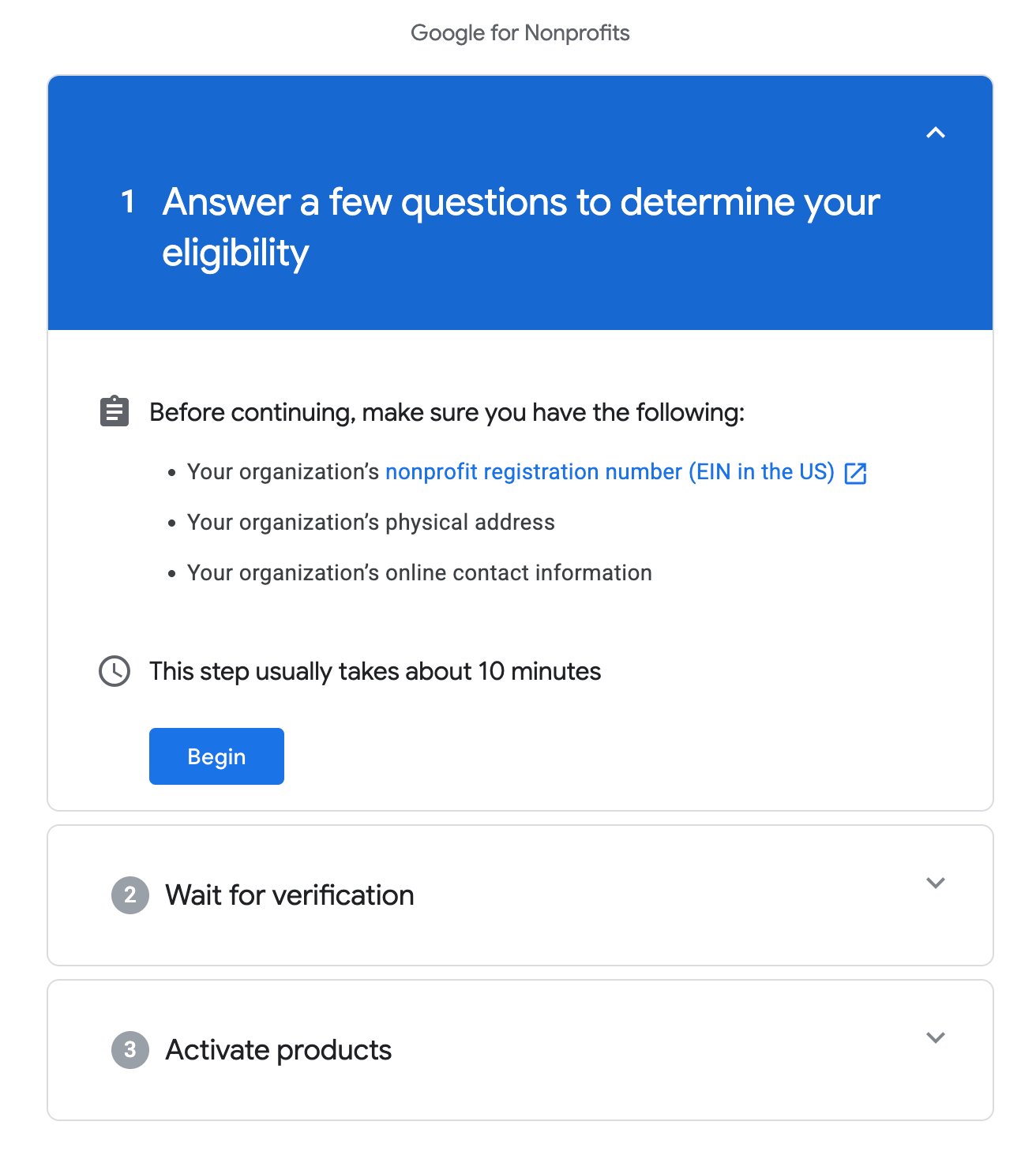
Critical Tip: Select your email carefully. The same email address is used for both Google for Nonprofits and your Ad Grants account. Use a camp-domain address that the organization controls. AVOID using a personal email address or a vendor’s email address if possible.
Sources: support.google.com/nonprofits/answer/3367631 and support.google.com/nonprofits/answer/6077350
Step 2: Activate Ad Grants
Congrats! Your Google for Nonprofits account is live. Now it’s time to get into Ad Grants. Here’s what to do:
- Sign in to google.com/nonprofits, and click “Get started” under Google Ad Grants.
- Watch the five-minute introductory video, then check the box.
- Submit your request. The review process can take several business days.
- Once approved, log in by going to ads.google.com. Sign in with the same email address you used to create your Google for Nonprofits account. Note: You can also go to google.com/nonprofits, scroll down to Ad Grants, and click the “Sign in” button there.
Critical Warning: Google clearly states, “Do not create a Google Ads account at any time during the Google Ad Grants activation process. An account will be provided for you at the time of activation.”
Sources: support.google.com/nonprofits/answer/6077350 and support.google.com/grants/answer/66163
The biggest roadblock people face
Amazing. Not only do you have a Google for Nonprofits account, you’ve set up Ad Grants. Most people quit before they ever get to this point, and they’re likely leaving thousands in free advertising on the table every month.
But, as much as I’d like to say you’re out of the woods, you’re not. This is where the real work begins, and there are some roadblocks most people hit early on. The crazy thing is, if you don’t get this right, Google will restrict or pause your ads. Or the campaign just never serves.
- Conversion tracking: Ad Grants policy requires at least one meaningful conversion per month. Meaningful can equal donations, registrations, sign-ups, or something similar. For a camp, we often use (1) inquiry forms, (2) lead form submissions directly on Google, (3) registration completions, (4) phone calls, or (5) outbound registration link clicks.
- To do this effectively, you need: Google Analytics (GA4) set up, at least one key event, the GA4-to-Google Ads link established, and a primary conversion import. Note: PMax campaigns won’t serve without a conversion goal.
- Advertiser verification: You’ll need to verify your legal name and location before ads will start serving. In rare cases, you may need additional documentation to verify.
Sources: support.google.com/nonprofits/answer/117827 and support.google.com/adspolicy/answer/9703665
Tip: Decide who owns the account early
Ideally, you want more than one admin on your account at any given time. Giving only one person keys to the kingdom isn’t a strategy we recommend. Instead, select at least two admins from within your own organization.
If desired, you can then add an agency or vendor as an additional user or manager, on either “Admin” or “Standard” access. If your internal admins are Google-Ads literate and active in the account, they can retain admin access themselves and offer standard access outwardly as needed. But if you trust your agency and they’ll be the main driver of the account, we recommend providing admin access. This allows them to work more independently and efficiently on your behalf.
Critical Note: Access is sacred. We’ve run into accounts where no one at the camp has admin access; only a previous, unreachable employee or vendor has it. At that point, it’s incredibly difficult to recover an Ad Grants account. It can take weeks to months. While it is absolutely possible, we recommend being deliberate about admin access early.
If your Ad Grants account already exists and you have no clue who controls it, use Google’s “access form” to recover. DO NOT apply for a second grant. Duplication is worse than a currently inaccessible account.
Sources: support.google.com/grants/answer/66163 and https://support.google.com/nonprofits/contact/grants_account_access_no_info
A realistic timeline
In total, this process typically takes anywhere from 1 to 3 weeks. And with paperwork ready and a compliant, well-run site, this process can go much smoother.
Don’t want to deal with the hassle? That’s where CampAds comes in. Schedule an initial account review today here.
We’ve successfully helped camps apply for both Google for Nonprofits and Ad Grants. We’ve helped optimize existing accounts. And we’ve even gone through the account recovery process (again, personally, we wouldn’t recommend it; get access locked down up front).
At the end of the day, we hope this demystifies the process for getting started. If you have any questions, we’d love for you to reach out at info@campadsus.com.
In the coming blogs
We’ll dive deeper into compliance and how to optimize your campaign structure. Stay tuned for more.
Lastly, thank you for your dedication to camp. As someone who not only went to camp but worked for a camp, I know you’re making the world a better place for kids and their families. Cheers to that.
— Cullan